Best Seller
Skip to product information
1 of 19

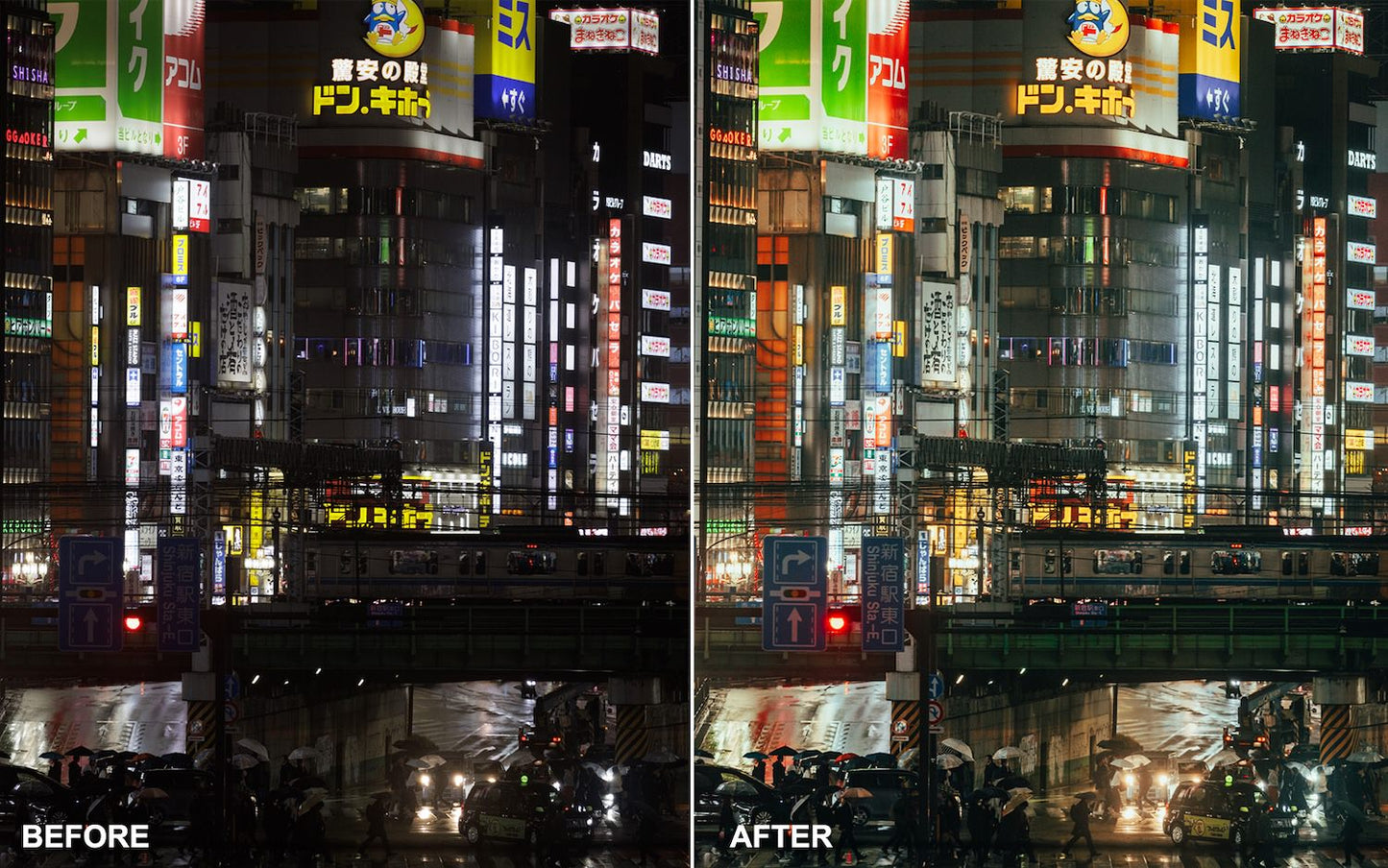
The Master Collection Lightroom Presets

The Master Collection Lightroom Presets

Regular price $65.00 USD
Regular price Sale price $65.00 USD
Sale Sold out

Lightroom Presets by Ypresets

The complete Ypresets Lightroom preset collection for photographers who shoot travel, landscapes, cities, people, and everyday moments.

46 presets across four collections. Built for RAW and JPEG from cameras and phones. Use them in Lightroom Mobile on iPhone or Android, and in Lightroom or Lightroom Classic on Mac or Windows.

  • 46 Lightroom Presets
  • 4 Complete Collections
  • Mobile + Desktop
  • RAW + JPEG
  • Instant Download

Four collections. One complete Lightroom preset library.

The Master Collection brings every Ypresets photo pack together in one download:

Made for RAW, JPEG and everyday photos

This is not an iPhone-only collection. The presets are made for photos from cameras and phones — mirrorless, DSLR, compact, and mobile — with RAW as the starting point. JPEG works too. After you apply a preset, you may want to nudge amount, exposure, or white balance to match the shot.

Why choose the Master Collection?

If you shoot a mix of subjects, one complete library is simpler than buying packs one by one.

  • All four Ypresets Lightroom packs in a single purchase
  • 46 presets for travel, landscape, urban, and everyday photos
  • Works on camera RAW and JPEG, plus phone photos
  • Lightroom Mobile and desktop in one download
  • Better value when you would buy two or more single packs anyway

A faster way to start your Lightroom edit

  1. Open your photo in Lightroom Mobile, Lightroom, or Lightroom Classic.
  2. Apply a preset from the collection that fits the subject.
  3. Adjust amount, exposure, or white balance if the shot needs it.
  4. Export when you are happy with the look.

Created by photographer Peter Yan

These presets come from how Peter edits his own travel, landscape, street, and everyday photos. The looks are practical starting points for real files — not heavy filters.

What you receive

  • 46 Lightroom presets (.XMP) across four collections
  • Travel & Lifestyle, Landscape & Nature, Urban & Street, and iPhone Everyday
  • Files for Lightroom Mobile (iPhone & Android) and Lightroom / Lightroom Classic (Mac & Windows)
  • Instant download after purchase (email + account.ypresets.com)
  • Install guide with the download

Lightroom compatibility

  • Mobile: Free Lightroom Mobile app on iPhone and Android
  • Desktop: Lightroom and Lightroom Classic on Mac and Windows
  • Photo files: RAW and JPEG from cameras and phones

Master Collection or a single preset pack?

Choose a single pack if you mostly shoot one style: Travel & Lifestyle, Landscape & Nature, Urban & Street, or iPhone Everyday.

Choose the Master Collection when you want all four packs together — one library for almost every photo you take.

One preset collection for almost every photo you take. Get the Master Collection

Buy this if you

This is the right collection if:

  • You edit photos in Lightroom from any camera — mirrorless, DSLR, compact, or phone — especially RAW
  • You shoot a mix of travel, landscapes, cities, people, and everyday moments
  • You want all four Ypresets Lightroom packs in one download
  • You would buy two or more single packs anyway

Don't buy this if you

Start with a single pack, or a LUT pack, if:

View full details

About this pack

What is included in the Master Collection?

The Master Collection includes 46 Lightroom presets across four complete Ypresets collections: 12 Travel & Lifestyle Presets, 12 Landscape & Nature Presets, 12 Urban & Street Presets and 10 iPhone Everyday Presets.

You also receive the files required for supported mobile and desktop Lightroom workflows, plus installation instructions.

Are these Lightroom presets for professional cameras or just iPhone?

Both.

The Master Collection can be used with photos from mirrorless cameras, DSLRs, compact cameras, iPhone, Android and other cameras supported by Adobe Lightroom.

The iPhone Everyday pack is one of the four included collections, but the Master Collection itself is not an iPhone-only product.

Do the presets work with RAW photos?

Yes.

The presets can be used with RAW files supported by Adobe Lightroom as well as JPEG images.

RAW files generally give you greater flexibility for adjusting exposure, white balance, highlights, shadows and colour after applying a preset.

Will they work with Sony, Canon, Nikon, Fujifilm or other cameras?

If Lightroom supports the photo file from your camera, you can use the presets with it.

This includes photos from many Sony, Canon, Nikon, Fujifilm, Panasonic, Leica and other camera systems.

The appearance of a preset can vary slightly between cameras, lighting conditions and camera profiles, so minor adjustments to exposure, white balance or preset amount may sometimes be needed.

Do they work on iPhone?

Yes.

You can use the presets in Adobe Lightroom Mobile on iPhone.

The Master Collection also includes the iPhone Everyday Presets, which were created specifically for normal everyday phone photos.

Do they work on Android?

Yes.

The presets can be imported and used in Adobe Lightroom Mobile on supported Android devices.

Do I need Lightroom?

Yes.

These are Adobe Lightroom presets and require a compatible version of Lightroom.

They can be used with Lightroom Mobile as well as Lightroom and Lightroom Classic on desktop.

Do I need to pay for Lightroom Mobile?

A paid Lightroom subscription is not required simply to import and use presets in Lightroom Mobile.

Some additional Adobe features may require a subscription.

Can I use the presets on Mac and Windows?

Yes.

The desktop preset files can be used with compatible versions of Adobe Lightroom and Lightroom Classic on Mac and Windows.

An appropriate Adobe subscription is required to use the desktop Lightroom applications.

Are these presets for photos or videos?

Photos only.

Lightroom presets are designed for still photographs.

If you are editing video, use the appropriate Ypresets LUT collection instead:

Will one preset work perfectly on every photo?

Not necessarily, and that is normal.

A preset applies a set of editing adjustments, but the final result depends on the original photograph, lighting, exposure, white balance, camera profile and file type.

After applying a preset, you may want to adjust the preset amount, exposure or white balance to suit the image.

Can I change the strength of a preset?

Yes.

Current versions of Lightroom include a Preset Amount control for compatible presets, allowing you to increase or reduce the overall strength of the look.

You can also continue adjusting Lightroom settings normally after applying a preset.

Can beginners use these presets?

Yes.

You do not need to be an experienced Lightroom user.

Choose a preset, apply it to your photo and adjust the amount or exposure if necessary.

Installation instructions are included with the download.

How do I install the presets?

Installation instructions are included with your download.

In Lightroom Mobile, compatible preset files can be imported into the Presets section. On desktop, the presets can be imported into Lightroom or Lightroom Classic.

How will I receive the presets?

This is a digital product.

After checkout, you will receive access to the preset files and installation instructions. Make sure the email address entered during checkout is correct so you can receive your download information.

Can I use the presets on photos I have already taken?

Yes.

The presets can be applied to existing photos in your Lightroom library or to new images you import later.

Can I edit the photo after applying a preset?

Yes.

A preset is simply a starting point. After applying it, you can adjust exposure, white balance, contrast, colour, masks or any other available Lightroom setting.

Does purchasing the Master Collection include future Ypresets products?

The purchase includes the four collections listed on this product page at the time of purchase.

Can I get a refund?

Because presets are instant digital products, purchases are generally non-refundable once digital access has been supplied or performance of the digital content has begun.

See the current Refund Policy for the complete terms.

Master Collection or a single preset pack?

Choose a single pack if you mainly photograph one type of subject and only need one editing style.

Choose the Master Collection if you photograph a mix of subjects or want the complete Ypresets Lightroom preset library.

The Master Collection includes Travel & Lifestyle, Landscape & Nature, Urban & Street and iPhone Everyday.

Customer Reviews

Overall rating: 4.8 / 5 from 74 reviews.

I bought the Master Collection recently on 31 January 2025, but after I installed them in my LR CC the individual presets I found under 2023 Presets folders ... hence found it disappointing that in 2025 I bought 2023 presets. Now if these presets are new then you should change the folder names under which the individual presets get installed in LR to reflect the correct year, otherwise it looks bad that you are selling 2023 presets in 2025. Also, why can't the individual presets be put under as Yantastic Presets when installed in LR to make it easy to find your presets under other 100s of folder presets that most people have installed in their LR software?

The Master Collection Lightroom Presets

Customer photo review of The Master Collection Lightroom Presets

I've been eyeing to buy these presets since I was in college (yes, it's been that long). When I could finally afford it, I didn't think twice and purchased it. The presets are so good they make my pictures look better! So far, I used them on my phone camera shots, and I am impressed. I can't wait to try them on my Canon camera pictures! Worth the wait and definitely worth the buy!

The Master Collection Lightroom Presets

Customer photo review of The Master Collection Lightroom Presets

The instructions on how to install on mobile need to be updated a bit for the latest software versions but eventually figured out the install process. Really happy with the quality of filters and wide variety of options! Highly recommend

The Master Collection Lightroom Presets

There is an abundance of present in this collection. Would be great to come with a comprehensive tutorial on how to use each of them. I tried learning from the youtube video of the demo for each preset. But would be good to know which and how to use them descriptively. Love your product and your work!

The Master Collection Lightroom Presets